myHealthAccess: a client portal for your practice

One place for your clients and patients to manage appointments, complete what you need before a visit, and follow their treatment — on any device, under your branding.

A client portal that belongs to your practice

Your practice stays open, even when reception isn't. Clients and patients sign in to see their next appointment, deal with anything outstanding before they arrive, and find what they would previously have phoned you for.
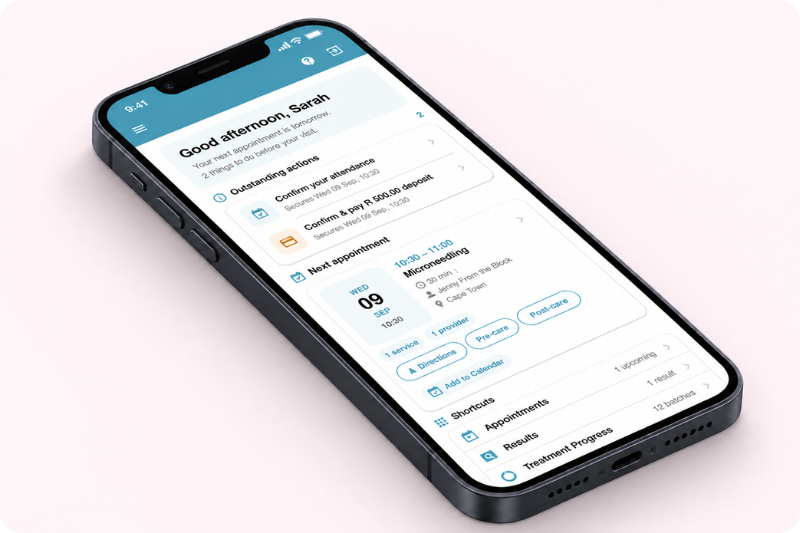
myHealthAccess portal on mobile

Opens in a browser

Nothing to download, on any device.

Built into HealthAccess

It draws on the data you already keep.

Branded as yours

Your logo, colours and wording throughout.

What clients can do

What appears in a particular portal depends on the features your organisation uses.

Appointments

  • The next visit, and anything outstanding before it
  • Confirm or cancel, within your rules
  • Settle an outstanding deposit
  • Rebook, where you offer online booking

Paperwork

  • Questionnaires, forms and consents completed and signed before arrival

Care information

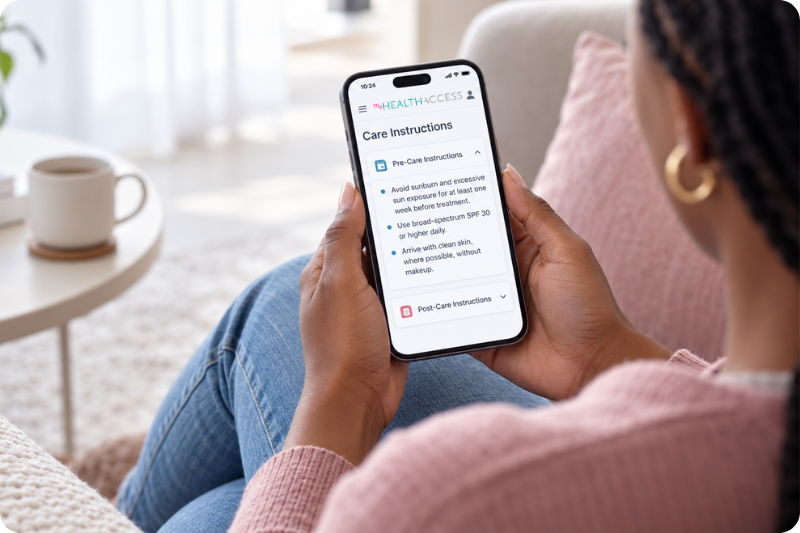
  • Your pre- and post-care instructions
  • Treatment information and what to expect
  • Directions and how to reach you

Records and products

  • Treatment progress, results and documents you have shared
  • Past purchases with reorder reminders
Client using myHealthAccess on mobile

Fewer calls to reception

Confirming attendance, settling a deposit, signing a consent form, checking the address — the requests that fill reception's day are the ones clients can now handle themselves.

Between visits

Before-and-after comparisons from the record you already keep, and the products they bought from you — with a reminder when it is time to reorder.

More about photo comparisons ›
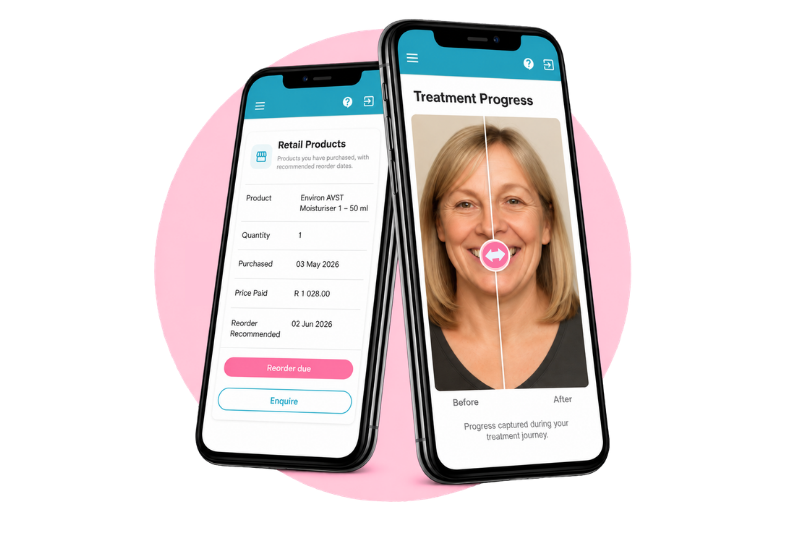
Treatment progress and retail on mobile

It looks like your practice, not like us

Your logo, colours and wording carry through the whole portal, alongside your contact details, directions, policies and your own care instructions.

Your logo and colours Your contact details Your care content Your policies

Already using HealthAccess?

The client portal forms part of your HealthAccess environment. To check what your clients will see, or to review your practice information and patient-facing content, talk to our team.

The portal continues to grow

We add to myHealthAccess regularly, and our practices hear about each release first.

Questions about the client portal

What is myHealthAccess?

It is the client portal that comes with HealthAccess practice software. Clients and patients use it to handle their next visit and to look back at what your practice has shared with them — under your branding, on any device.

Do clients need to download an app?

No. The portal opens in a web browser, and clients reach it from the links your practice already sends them. There is nothing to download and nothing for your practice to distribute.

How do clients get access?

Through secure links from your practice. There is no separate account for clients to create and no password for your reception team to reset. We take your team through access in detail once you are set up.

Does every practice get every feature?

No. What a client sees depends on which parts of HealthAccess your practice uses and what you have chosen to share. A dental practice's portal and a skin clinic's portal will not look the same.

Can clients cancel or reschedule their own appointments?

Within the limits you set. Your practice decides how far ahead a client may confirm or cancel, so the portal never overrides your cancellation policy.

Is the portal branded for our practice?

Yes. Your logo, colours and wording carry through every screen, alongside your contact details, directions, your own care instructions and your policies.

How is client information protected?

Clients see only their own information, and only what your practice has shared with them. Our Trust Centre sets out how HealthAccess handles practice and client data.

Where can we see the full walkthrough?

Book a demo and we will take you through the portal with your own practice in mind, and answer whatever your team needs to know.

See it with your own practice's branding

We will show you what your clients would see, and answer whatever your team needs to know.

Book a Demo